

The Aputure MC Pro is one of those lights that looks small at first, but quickly becomes useful once you start working on real productions. It is not designed to replace a large key light — instead, it works best as a compact RGBWW light for accent lighting, hidden practicals, product shots, background colour, car interiors, small studio setups, and fast-moving production days where flexibility matters.
If you are searching for the Aputure MC Pro, you are probably already past the casual browsing stage. You may be asking whether it is worth buying, whether one light is enough, or whether the Aputure MC Pro 8-Light Kit makes more sense for your workflow. This guide breaks down what the MC Pro actually offers over the original MC, the key specs, who it is for, where it works best, and when filmmakers and creators should consider adding it to their lighting kit.
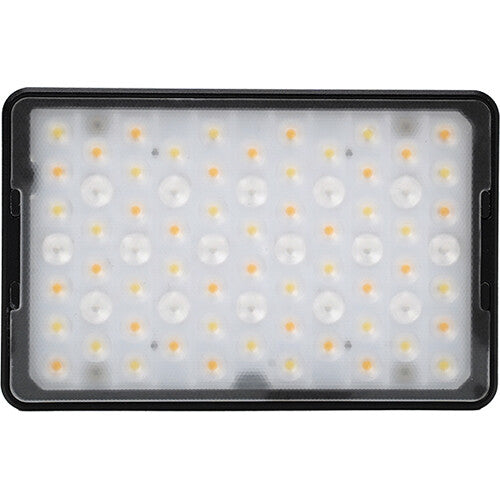
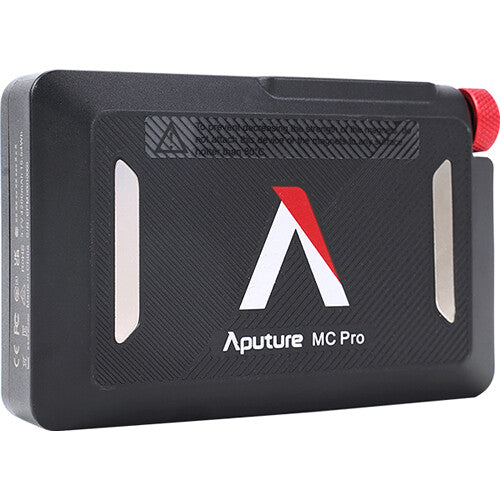
Table of Contents
- What Is the Aputure MC Pro?
- Aputure MC Pro Key Specs at a Glance
- What These Specs Actually Mean on Set
- Aputure MC Pro vs Original MC
- The Sidus Link Ecosystem
- Who Should Buy the Aputure MC Pro?
- Real Production Scenarios
- Single Light vs 8-Light Kit
- What's in the Box
- Should You Upgrade from the Original MC?
- MC Pro vs MT Pro
- Buyer Checks Before Ordering MC Pro
- Where the MC Pro Falls Short
- Is the Aputure MC Pro Worth It?
- Recommended Aputure MC Pro Setups
- Where to Buy the Aputure MC Pro in Canada
- FAQ
- Final Verdict
What Is the Aputure MC Pro?
The Aputure MC Pro is a compact RGBWW LED light panel designed for professional productions, creators, and small crews that need a portable light with strong colour control, weather resistance, and flexible mounting options.
Compared with a traditional on-camera light, the MC Pro is more than just a simple fill light. It can be used as a hidden accent light, practical light, background colour source, product highlight, or compact emergency light on set.
For creators and filmmakers, the biggest advantage is simple: the MC Pro gives you a lot of creative lighting control in a very small package — and unlike the original MC, it has been rebuilt around the needs of professional sets.
Aputure MC Pro Key Specs at a Glance
| Spec | Aputure MC Pro |
|---|---|
| Output | 5W RGBWW LED |
| Battery runtime | Up to 120 minutes* |
| Colour system | RGB + Warm White + Cool White |
| Weather resistance | IP65 rated |
| Wireless control | CRMX, Bluetooth, Sidus Link app, DMX |
| Mounting | Built-in magnets + magnetic accessory ecosystem |
| Form factor | Pocket-sized aluminium body |
| Weight | 247g / 0.54 lbs |
| Kit option | Available as single light or 8-Light Production Kit |
*Battery runtime is based on Aputure's official testing at 100% intensity, 5600K. Real-world runtime will vary depending on brightness, colour mode, and ambient temperature — most on-set use is well below 100% intensity, which extends battery life significantly.
These numbers matter because they define where the MC Pro can go on set. The IP65 rating means rain, dust, and splash environments are fair game. The 120-minute headline runtime covers most setup-to-wrap windows without needing to swap to mains power. And CRMX support means the MC Pro plays well with professional lighting consoles, not just the Sidus Link app.
What These Specs Actually Mean on Set
A spec sheet is just numbers until you put the light to work. Here is what each headline figure tends to mean in real production conditions.
IP65 Weather Resistance — Fewer "Pack-Up" Moments
Rain showers during a documentary shoot, mist at a beach scene, dusty backstage stairwells — conditions that normally force a non-rated LED back into its case — generally do not stop the MC Pro. It does not mean submersible, and it does not replace common sense around water-damaged electronics. But for most weather-related production stress, IP65 takes one thing off the worry list.
CRI / TLCI in the Mid-90s — Less Time Pulling Skin Tones Back in Post
Skin tones tend to render cleanly, and the MC Pro avoids the subtle green cast that often shows up on cheaper LEDs. That generally means less time pulling colour back in post — though colour rendering on set involves many variables (mixed practicals, white balance, camera profile), so a high-CRI light just means the fixture itself is one less variable to wrestle with.
5W RGBWW Output — Small-Scene Key or Strong Fill, Not a Large-Room Solution
At close range in controlled small scenes — say 1 metre on a face for a tight medium shot, or 30–50 cm on a small product — the MC Pro can work as a small key or strong fill. For tabletop product work or close-up creator setups, it can be the main source. It is not built to key a full-body shot in a larger room — step back to 2–3 metres or push through heavy diffusion and it returns to accent/fill territory.
Up to 120 Minutes of Battery — Full Interview Without Anxiety
At 100% intensity it covers a full sit-down interview on internal battery. But typical on-set use rarely sits at 100% — at 25–50% intensity (where accent and fill work usually live), runtime extends beyond the published figure. For a multi-light setup running at low-to-mid output, half-day shoots on internal batteries are generally realistic — though actual runtime depends on brightness, colour temperature, and whether effects modes are running.
Magnetic Accessory Ecosystem — 10-Second Modifier Swaps
Switching between flat diffuser, dome diffuser, and 30° grid is a snap-on motion — no thumbscrews, no thread alignment, no fumbling for parts in low light. On a fast-moving set where the next setup needs a softer source or a tighter beam, that saves real time and reduces small-part loss.
What's New: Aputure MC Pro vs Original Aputure MC
This is the question most buyers actually want answered. The original MC made compact RGB lighting accessible. The MC Pro is the professional-grade rebuild — and the differences are not subtle.
| Feature | Aputure MC | Aputure MC Pro |
|---|---|---|
| Output | ~1W class | 5W — roughly 5× the punch |
| Weather resistance | None | IP65 rated |
| Wireless DMX | App / Bluetooth only | CRMX + Bluetooth + Sidus Link + DMX |
| Battery runtime | Around 1.5 hours typical | Up to 120 min (100% intensity, 5600K) |
| Mounting | Single rear magnet | Magnetic accessory ecosystem (grids, diffusers, barn doors, baby pin) |
| Target user | Casual creator, on-camera fill | Pro production, gaffers, rental, multi-light setups |
| Kit option | Single / 3-light | Single / 8-Light Production Kit |
The takeaway: if you only need a small RGB light for desk videos or occasional background colour, the original MC may still be enough. If you are taking on paid client work, shooting outdoors, running multi-light rigs, or need professional control protocols, the MC Pro is the right tool and the original MC is not really comparable.
Beyond the Hardware: The Sidus Link Ecosystem
Buying an MC Pro is not just buying a light — it is also stepping into the Sidus Link control system, which is where a lot of the MC Pro's practical value lives day-to-day.
App Control for One or Many Units
The Sidus Link app lets you control a single MC Pro or a group of them from your phone — dimming, colour temperature, HSI hue/saturation, and effects all run from the same interface. For solo creators this means adjusting the light from camera position without walking back to it. For crews running multiple units, it means co-ordinated changes across the kit from one operator.
Sidus Mesh — Control Alongside Other Aputure Fixtures
The MC Pro is part of Aputure's Sidus Mesh network. In practice, that means the MC Pro can integrate with other compatible Aputure fixtures in the Sidus Link ecosystem — so a single app session can co-ordinate dimming and colour across multiple fixtures from the same controller. Specific compatibility depends on the fixture model and firmware version, so verify against the Sidus Link supported-fixture list for your existing kit before planning a setup around it.
Effects Modes — Built-In Creative Tools
The MC Pro carries a library of built-in lighting effects — including Lightning, TV, Police Lights, Faulty Bulb, Fire/Candle, Strobe, and others — that simulate common practical light sources. For short-form narrative, music video work, or branded content that needs a quick TV-glow or lightning-flash effect, these often save you from gelling and triggering a separate fixture.
HSI / RGBWW — Partial Gel Kit Replacement
The MC Pro's HSI mode gives 360° hue control with saturation adjustment, and the underlying RGBWW (not just RGB) engine generally renders white-adjacent colours more cleanly than a pure RGB light. In practice, this can replace a portion of a gel kit for colour-matched practicals or stylised washes — not a full substitute for a dedicated full-colour cinema fixture on hero shots, but for most accent-light colour needs it removes the need to carry gel material.
Firmware-Upgradeable
The MC Pro receives firmware updates through Sidus Link. Per Aputure's product page, the V2.0 firmware update added DMX smoothing options, 16-bit DMX profiles, and an updated colour mixing algorithm. The practical takeaway: capabilities can grow after purchase rather than freeze on shipping day — though specific feature availability should be verified against your fixture's current firmware version.
Who Should Buy the Aputure MC Pro?
The Aputure MC Pro is not for everyone. If you only need a large soft key light, you may be better served by a COB light or a larger LED panel. But if you need small, flexible lights that can be placed almost anywhere — including outdoors and in tight spaces — the MC Pro becomes much more valuable.
Filmmakers and Small Crews
For filmmakers, the MC Pro is useful because it can hide in places where larger lights cannot. It can be placed behind furniture, inside cars, near props, on metal surfaces, or in tight corners to add colour, separation, or visual interest. The IP65 rating also means you can rig it outside without a rain cover for short setups.
Small crews often do not have time to rig large fixtures for every shot. A compact light like the MC Pro can solve problems quickly, especially when you need a little bit of extra colour, a small eye light, or a practical glow in the background.
Content Creators and YouTubers
For YouTubers, streamers, podcasters, and solo creators, the MC Pro can help add production value without taking up much space. It can light a background wall, add colour behind a desk setup, create a small product highlight, or provide a subtle fill light. Because it is compact and easy to move, it works well for creators who shoot in bedrooms, offices, small studios, or shared workspaces.
Product Photography and Commercial Video
For product shoots, the MC Pro is especially useful as a small accent light. It can add edge highlights, colour reflections, or controlled light to small objects — useful for tech products, cosmetics, accessories, drinks, tools, and camera gear where a large light may be too strong or too difficult to control.
Gaffers and Rental Houses
The 8-Light Kit specifically targets this group. CRMX support, IP65 build, magnetic accessories with dedicated case slots, and a single charging case for all eight units make the MC Pro Kit fast to deploy and easy to inventory between jobs.
Aputure MC Pro Real Production Scenarios
The MC Pro is most useful when you think of it as a creative problem-solving light. Here are six common scenarios that map to the way professionals actually use it on set — each tied to the SKU that makes the most sense for that workflow.
Interview Eye Light + B-Roll Background Colour (Single MC Pro)
A standard sit-down interview can lift dramatically with a small eye light tucked behind the camera and a subtle colour wash on the back wall. A single MC Pro on a magnetic plate or articulating arm handles either job — and often, the same light gets moved between setups within minutes. For documentary and corporate work where you are already lugging a key light, this is the lowest-friction way to add production value.
Tight-Space Practical Lighting for Weddings and Documentary (1–2 MC Pros)
Wedding venues, documentary interiors, and ENG shoots rarely give you room for a stand. The MC Pro's pocket form and built-in magnets let it stick directly to door frames, AC vents, light fixture stems, or any metal surface to become a motivated practical source — no stand, no rigging time. For a wedding videographer or documentary shooter working solo, one or two MC Pros in the bag cover a surprising number of "this room needs a touch of warm light over there" problems.
Tabletop Product Photography (2–3 MC Pros or 8-Light Kit)
Two MC Pros provide a soft key + accent for small-product video; three add a coloured rim or background light. For an in-house product team shooting dozens of SKUs a week, the 8-Light Kit is the right answer — fully charged in one case, complete accessory inventory, every modifier in its slot for quick configuration changes.
Music Video and Short-Film Creative Colour (Multiple MC Pros via Sidus Link)
HSI control and the built-in effects library make the MC Pro genuinely useful as a creative tool — coloured eye-line glows, motivated phone-screen flicker, simulated TV bounce off a wall, police-light wash through a window. For these jobs, the value of running multiple lights from one Sidus Link session adds up fast, and the 8-Light Kit removes the friction of charging and accessory inventory.
Outdoor, Vlog, and Run-and-Gun (Single MC Pro)
IP65 is what makes this scenario possible. A creator shooting at a beach, in light rain, or in a damp park can keep the MC Pro on the camera or on a portable arm without packing it up at the first sign of weather. The 247g body and pocket form factor mean it travels in the same bag as a hybrid camera kit — no separate lighting case required.
Gaffer-Driven Multi-Light Builds (8-Light Kit)
On commercial shoots and music videos, lighting plans often call for a string of small coloured accents — practicals visible in frame, set-dressing colour, edge highlights spread across the room. The 8-Light Kit gives a gaffer eight CRMX-controllable units in one rolling case, with accessories pre-organized for fast deployment and equally fast wrap. This is where the 8-Light Kit decisively beats "eight singles" — the wireless charging case and accessory foam slots are the difference between a clean wrap and a missing-piece headache.
Aputure MC Pro: Single Light vs 8-Light Kit
One of the most common questions is whether you should buy one MC Pro or the 8-Light Kit. The honest answer comes down to how often you shoot, how many small lights you need at the same time, and how much your time on set is worth.
Comparison: Single Light vs 8-Light Kit
| Single MC Pro | MC Pro 8-Light Kit | |
|---|---|---|
| Number of units | 1 | 8 |
| Charging | Individual USB-C cable | Wireless charging for all 8 simultaneously in the kit case |
| Accessory storage | Sold separately | Full accessory set with dedicated foam slots for every piece |
| Inventory / check-in | Manual | Visual check — empty slot = missing piece, ideal for rental and crew handover |
| Best for | Solo creators, occasional accents | Crews, gaffers, rental houses, multi-light productions |
| Transport | Camera bag | Production case |
When One Aputure MC Pro Is Enough
A single light is enough for small creator setups, product shots, background accents, practical light effects, on-camera fill, or simply testing whether the MC Pro fits your workflow. If you are a solo creator, YouTuber, photographer, or filmmaker who needs one small RGB light in your bag, start here.
When the 8-Light Kit Makes More Sense
The 8-Light Kit is the right choice when you regularly need multiple small lights on the same set: commercial video, music videos, studio productions, multi-camera interviews, scenes with several practical sources, product video teams, and any gaffer who runs accent lighting across a wider scene.
The two features that justify the kit over buying 8 individual MC Pros are practical, not marketing:
- The case charges all 8 lights wirelessly at the same time. No cable bundle, no power strip, no rotating units onto a charger overnight. Drop them in, close the lid, done.
- Every accessory has its own dedicated slot. Magnetic grids, diffusers, barn doors, mounting hardware — each piece sits in cut foam. At wrap, a single glance tells the AC or rental tech whether anything is missing. For rental houses and production companies, that alone saves hours and prevents missing-piece charges.
If you bill clients, work with rental gear, or rely on consistent gear returns, the 8-Light Kit is not a luxury — it is the version of the product built for your workflow.
Quick Decision Guide
- Solo creator, desk vlogs, occasional background colour → the original Aputure MC may still cover your needs; the MC Pro is overkill.
- Paid client work, outdoor shoots, professional control protocols → a single MC Pro is the right starting point.
- Multi-light builds, gaffer kits, rental house inventory, music-video volume work → go straight to the 8-Light Production Kit. Buying eight singles ends up more expensive and less organized.
What's in the Box
Single MC Pro
The single light typically ships with the MC Pro fixture, USB-C charging cable, and basic accessories. Specific bundled magnetic modifiers vary by region and retailer SKU, so verify the contents with the seller if particular accessories matter to your workflow.
MC Pro 8-Light Production Kit
Kit contents can vary by SKU and shipment; confirm the current package before purchase if a specific accessory matters.
- 8× MC Pro fixtures
- 1× Charging Case (wireless Qi charging for all 8 units simultaneously)
- 8× MC Pro Flat Diffusers
- 8× MC Pro Dome Diffusers
- 8× MC Pro Light Control Grids (30°)
- 4× Cold Shoe Ball Heads
- 4× ¼"-20 Screw to Magnetic Plate Adapters
- 4× ¼"-20 Screw to Baby Pin Adapters
- 2× ¼"-20 Articulating Arm to Clamp Adapters
- 2× USB-C Charging Cables
- 32× Adhesive Magnetic Plates
- 1× AC Power Cable
- 1× D-Tap Power Cable
- Limited 1-Year Manufacturer Warranty
Confirm exact SKU contents with your retailer before purchase, particularly if a specific accessory is part of your decision to buy the kit over individual units.
Aputure MC Pro vs Aputure MC: Should You Upgrade?
If you already own the original MC, the upgrade question depends on what you actually do with it.
- Stick with the original MC if you mostly use it for desk videos, casual on-camera fill, or occasional background colour at home.
- Upgrade to the MC Pro if you find yourself needing more output, shooting outdoors or in damp conditions, running paid client work, building multi-light scenes, or integrating with a professional lighting control system over CRMX or DMX. The MC Pro is not just a brighter MC — it is built around production reliability in a way the original was not.
MC Pro vs MT Pro: Pocket Panel or Pixel Tube?
The Aputure MC Pro and Aputure MT Pro are often compared because both are compact RGB lights, but they solve different shots. Choose the MC Pro when you need a pocket panel for hidden practicals, eye light, product details, quick magnetic placement, and multi-light kits. Choose the MT Pro when the shot needs a short 1 ft pixel tube, a visible line of color, built-in pixel effects, or tube-style placement in shelves, cars, backgrounds, and product scenes.
For wet setups, do not treat the MT Pro body as waterproof. Aputure's Help Center says the MT Pro does not feature waterproof construction, while Aputure sells an optional MT Pro waterproof pouch for wet or underwater-style placement. MC Pro is the stronger direction when you need an IP65 weather-resistant pocket light, but IP65 still means weather resistance, not submersion.
Buyer Checks Before Ordering MC Pro
- One light or 8-light kit: choose one MC Pro for testing, small accents, or product details; choose the 8-light kit when charging, case organization, repeatable multi-light scenes, and rental-style handling matter.
- Heat and charging: compact RGB fixtures can get warm during long use or charging workflows. Leave airflow, test the setup before a long shoot, and do not hide the fixture where heat cannot escape.
- MC Pro vs MT Pro: pick MC Pro for pocket-panel placement and weather-resistant planning; pick MT Pro for pixel-tube looks and use the optional pouch if wet placement is part of the shot.
- Not a large key light: MC Pro is excellent for accents, eye lights, practicals, background color, and tabletop details, but a panel, COB, or soft mat is still the better choice for larger key light or softbox work.
Where the MC Pro Falls Short
In the interest of an honest buying decision, here are the situations where the MC Pro is not the right tool:
- Main key light for full-body shots in larger rooms. At 5W, the MC Pro is built for small-area lighting. A talking-head close-up at 1 metre is comfortable; a full-body two-shot in a 4-metre living room is not. For that, look at an amaran 60-class fixture for budget builds, or the Aputure LS 600 series for serious key work.
- Large soft sources. The MC Pro's pocket form means the emitting surface is small, which limits how soft the light can wrap around a subject even with a dome diffuser. For genuinely soft, large-source key lighting, a panel-style fixture is the right call.
- Cost-per-light. A single MC Pro is meaningfully more expensive than the original MC. Per-watt value and per-feature value are excellent, but if you only need one light occasionally, the original MC may stretch the budget further.
- Multi-unit budget reality. Eight MC Pros add up, even in the kit form. The kit is justified by the wireless charging case, accessory organization, and rental-ready packaging — but it is a real budget line, not a casual buy.
- Not a substitute for a dedicated full-colour cinema fixture. The MC Pro's RGBWW output handles colour-effect accent work well, but for full saturation across the visible spectrum on a hero shot, a dedicated RGB cinema fixture (such as the Nova series) gives more headroom.
These are framing points, not deal-breakers. The MC Pro is built to shine exactly where it was designed to shine — and acknowledging where it does not helps you decide whether it is the right fit for your kit.
Is the Aputure MC Pro Worth It?
Yes — if you regularly need a compact RGBWW light that can be used across many shooting scenarios.
It is especially worth it if you shoot video regularly, need portable accent lights, work in small spaces, film product videos, want quick background colour, need lights that hide on set, or work in environments where weather resistance and wireless control actually matter.
It is not the right choice if you are looking for a main key light for large spaces. For that, look at larger Aputure lights such as the COB series or higher-output LED panels. The MC Pro is best understood as a flexible production tool, not a replacement for your main light.
Recommended Aputure MC Pro Setups
Single-Light Creator Setup
Best for YouTubers, streamers, solo creators, and small product shoots. Use it for background colour, desk setup accents, small product highlights, practical lights, and close-up fill.
Filmmaker Pocket Light Setup
Best for filmmakers who want a compact light always in the camera bag. Use it for car interiors, hidden lights, location shoots, emergency fill, and small practical lighting setups — including outdoor environments where the IP65 rating matters.
Production 8-Light Kit Setup
Best for crews, gaffers, production companies, commercial video teams, and studio setups. Use it for multi-light background setups, music videos, commercial shoots, product campaigns, controlled practical lighting, and full-scene colour effects controlled over CRMX.
Where to Buy the Aputure MC Pro in Canada
If you are looking for the Aputure MC Pro in Canada, FilmGear Canada carries both the Aputure MC Pro RGB LED Light Panel and the Aputure MC Pro 8-Light Production Kit. FilmGear Canada is based in Vancouver, BC, and supports filmmakers, creators, production companies, and studio teams across Canada.
Buying locally helps with:
- Canadian warranty support
- Faster domestic shipping
- Local product advice
- Vancouver showroom access
- Pre-sale consultation
- Help choosing between a single light and the 8-Light Kit


→ Explore all Aputure lighting at FilmGear Canada
Warranty and Support
The MC Pro 8-Light Production Kit ships with a Limited 1-Year Manufacturer Warranty (per Aputure's official kit listing). Single-unit warranty terms vary slightly by region and authorized dealer, so verify specifics at point of purchase. Buying from an authorized Canadian dealer like FilmGear Canada generally means warranty and support are handled in-country rather than through a grey-market import channel — which translates to faster issue resolution, easier returns, and local technical support if you run into firmware, accessory, or charging issues.
Frequently Asked Questions
What is the difference between Aputure MC and MC Pro?
The MC Pro delivers 5W of RGBWW output (significantly more than the original MC), adds IP65 weather resistance, supports CRMX wireless DMX in addition to Bluetooth and the Sidus Link app, runs up to 120 minutes per Aputure's official testing (100% intensity, 5600K), and ships with a full magnetic accessory ecosystem. It is also available as an 8-Light Production Kit. The original MC remains a fine entry-level option for casual creators; the MC Pro is built for paid client work, outdoor shoots, and multi-light professional setups.
Is the Aputure MC Pro magnetic?
Yes. Strong built-in neodymium magnets allow it to mount directly to metal surfaces. The MC Pro also supports a dedicated magnetic accessory line including grids, diffusers, barn doors, baby pin adapters, and articulating arms.
How long does the Aputure MC Pro battery last?
Aputure's official spec is up to 120 minutes, measured at 100% intensity and 5600K. Real-world runtime extends significantly at lower brightness levels, which is how the light is used most of the time on set. For long shoot days, the 8-Light Kit's wireless charging case keeps a full team of units topped up between setups.
Does the Aputure MC Pro support DMX or CRMX?
Yes. The MC Pro supports CRMX wireless DMX, which is the standard professional protocol used on film and commercial sets. It also supports wired DMX, Bluetooth, and the Sidus Link app for app-based control.
Is the Aputure MC Pro weatherproof?
The MC Pro is IP65 rated, meaning it is protected against dust and low-pressure water jets. That covers most real-world rain, mist, beach, and damp-location scenarios — but it is not a fully submersible light.
Should I buy one Aputure MC Pro or the 8-Light Kit?
Buy one if you need a compact pocket light for occasional accents, product shots, or creator setups. Choose the 8-Light Kit if you regularly work on commercial shoots, music videos, multi-light interviews, or practical-heavy scenes. The kit's two killer features are wireless charging for all 8 units in a single case and dedicated foam slots for every accessory — both of which save real time for crews and rental houses.
Final Verdict
The Aputure MC Pro is worth buying if you need a small, flexible RGBWW light that can solve many production problems quickly. The 5W RGBWW output, IP65 build, CRMX control, and up to 120 minutes of runtime (Aputure spec, 100% intensity at 5600K) turn what looks like a pocket light into a real production tool.
For solo creators, one MC Pro is enough to seriously improve a desk setup, product video, or background scene. For filmmakers and production teams, the 8-Light Kit is the more complete answer — its wireless charging case and accessory-organized hard case make it the version designed for actual working sets and rental inventory.
If your goal is portable colour, hidden accent lighting, weatherproof reliability, and more creative control in a kit you can actually carry, the Aputure MC Pro is one of the most useful compact lights you can own.
Share:
Aputure STORM 400x Buying Guide: Best Use Cases for Small & Mid-Sized Productions
Aputure MT Pro Review & Guide: When to Use a Tube Light on Set