

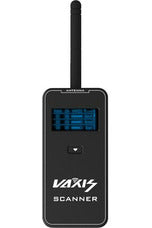
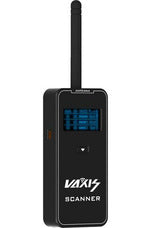
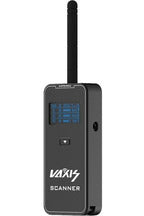


Vaxis Channel Scanner
SKU: Vaxis-VSA19-001
Before ordering, send Filmgear Canada the link so we can verify the price including shipping.
- Identical productSame brand and model, new and unopened, with a manufacturer warranty in Canada.
- Canadian sellerAn authorized retailer or official brand store, priced in Canadian dollars.
- Available nowThe seller has it in stock and you can buy it now at the listed price.
- Delivered priceWe compare the total price including shipping.
Exclusions: Third-party marketplace sellers, foreign sites, clearance, open-box, demos, refurbished, limited-quantity offers, price errors.
If we lower this model's price within 7 days of purchase, we'll refund the difference.
Couldn't load pickup availability
Pickup available at Filmgear Canada (enter at 945 E Cordova St)
Usually ready in 2 hoursPairs well with
Vaxis Channel Scanner
If you have any questions, you are always welcome to contact us. We'll get back to you as soon as possible, within 24 hours on weekdays.
-
Shipping Information
Ships from Vancouver, BC across Canada. Free standard shipping on orders over $199 CAD (remote areas and oversize or overweight items excluded). In-stock orders placed before 2 PM Vancouver time ship the same business day. Pre-order and special order items ship when they arrive. Local pickup at our 945 E Cordova St showroom, usually ready in 2 hours for in-stock items.
-
Customer Support
Email info@filmgearcanada.com or call (604) 269-4161. Our team gives pre-purchase advice, helps you spec the right model for your shoot, and confirms compatibility before you order. Open Monday–Saturday, 9:30 AM – 5:00 PM PT. In-store consultation at our Vancouver, BC showroom.
-
FAQ’s
Authorized Canadian dealer for Aputure, amaran, DJI, Nanlite, Tilta, and more. All products include full manufacturer warranty and Canadian-side support. For B2B / production-house pricing or net terms, email info@filmgearcanada.com — we work with crews and studios across Canada.
-
Contact Us
Filmgear Canada — 945 E Cordova St #108, Vancouver, BC V6A 1H9. Phone: (604) 269-4161. Email: info@filmgearcanada.com. Showroom open Mon–Sat, 9:30 AM – 5:00 PM — walk-ins welcome, no appointment needed.
Vaxis Channel Scanner is a wireless channel scanner for evaluating the RF environment around a compatible Vaxis wireless video workflow before transmitters and receivers are assigned. Filmgear Canada supports Canadian crews with model selection, system fit, and practical production planning.
Product Overview
Channel scanning helps a crew see local activity before choosing frequencies, but it does not replace an on-set RF plan or a full range test. Use the scanner at the real camera, receiver, video-village, and movement positions, then compare results with the channels supported by the transmitter and receiver. Buildings, people, vehicles, Wi-Fi, nearby productions, antennas, region settings, and firmware can change conditions throughout the day. Check the supported band, power, charging, interface, scan procedure, region, channel map, and compatibility with the intended Vaxis system before relying on the result.
Key Features
RF Environment Check
The scanner helps crews inspect local wireless activity before assigning channels to a video link.
Vaxis Workflow Planning
Use the channel information alongside the supported frequencies, region, firmware, and channel map of the exact transmitter and receiver system.
Location-Based Testing
Scan from the real camera and monitoring positions because walls, people, vehicles, Wi-Fi, and nearby crews can change the usable spectrum.
How It Compares
Choose the Vaxis Channel Scanner when dedicated RF checking is needed for a Vaxis wireless video package. Choose built-in spectrum tools when the transmitter or receiver already provides them, or use a broader professional RF analyser when multiple wireless departments and frequency bands must be coordinated.
Compatible Accessories and Related Gear
MOVMAX Cine Slider (Mitchell Mount) and Vaxis ATOM 600 KV Wireless TX/RX Kit for RED KOMODO. Check frequency-band support, regional rules, channel map, firmware, power, charging, interface, and the exact Vaxis transmitters and receivers being coordinated. Treat the scan as one input to the final on-set range and reliability test.
Who Is This For?
For DITs, camera assistants, video assist, rental houses, live-production crews, studios, and wireless coordinators planning Vaxis links in busy RF environments.
Who Should Choose Something Else?
Choose the system's built-in scanner for a smaller package, a full RF analyser for multi-department coordination, or wired SDI when reliable cable routing is practical and wireless congestion is unacceptable.
In the Box
- Vaxis Channel Scanner
Specifications
- Role: wireless video channel scanner
- System family: Vaxis wireless video
- SKU: Vaxis-VSA19-001
FAQ
What is Vaxis Vaxis-VSA19-001 designed to do?
Vaxis Channel Scanner (Vaxis-VSA19-001) is designed for checking wireless video channel conditions before a production link is assigned. Review the named interface, dimensions, camera or support system, and working load before adding it to a production package.
What should I check before using Vaxis Vaxis-VSA19-001?
Before using Vaxis Channel Scanner (Vaxis-VSA19-001), check the mating interface, fasteners, cable or battery requirements, clearance, balance, payload, and every attached component in the finished setup.
How does Vaxis Vaxis-VSA19-001 compare with another option?
Vaxis Channel Scanner (Vaxis-VSA19-001) is the better choice when a dedicated vaxis wireless channel scanner matches the job. Select another model when the mount, size, operating distance, power standard, or system role differs.
Is Vaxis Vaxis-VSA19-001 suitable for professional production?
Vaxis Channel Scanner (Vaxis-VSA19-001) can serve professional crews when its stated role fits the camera package and the complete setup is tested before the shoot. Rental, studio, live, and location teams should document their final configuration.
Where can I buy Vaxis Vaxis-VSA19-001 in Canada?
Filmgear Canada supplies Vaxis Channel Scanner (Vaxis-VSA19-001) with Canada-wide shipping and Vancouver-based help for model selection, compatible accessories, setup planning, and production support.
Where to Buy in Canada
Buy Vaxis Channel Scanner from Filmgear Canada with Canada-wide shipping and Vancouver-based help for exact model fit, system compatibility, and production workflow planning.
This item is final sale. It cannot be returned, exchanged or refunded.
Final sale items may be Special Order items, open box, demo or display units, or clearance items.
If your item arrives damaged or defective, contact us immediately on delivery. Email info@filmgearcanada.com with a short video of the problem and the serial number. We will handle it under the manufacturer's warranty terms.
Before buying, ask us about compatibility, lead time or whether this gear suits your project at info@filmgearcanada.com or (604) 269-4161. Read our full Return Policy.